

ShoSERPRank Tracker
Free Google Rank Checker and Rank Tracker
Where does your site appear when someone searches for your product? ShoSERP is a free rank tracker for Google. Choose a country and language, see which of your pages ranks, and open the search results saved with that position.
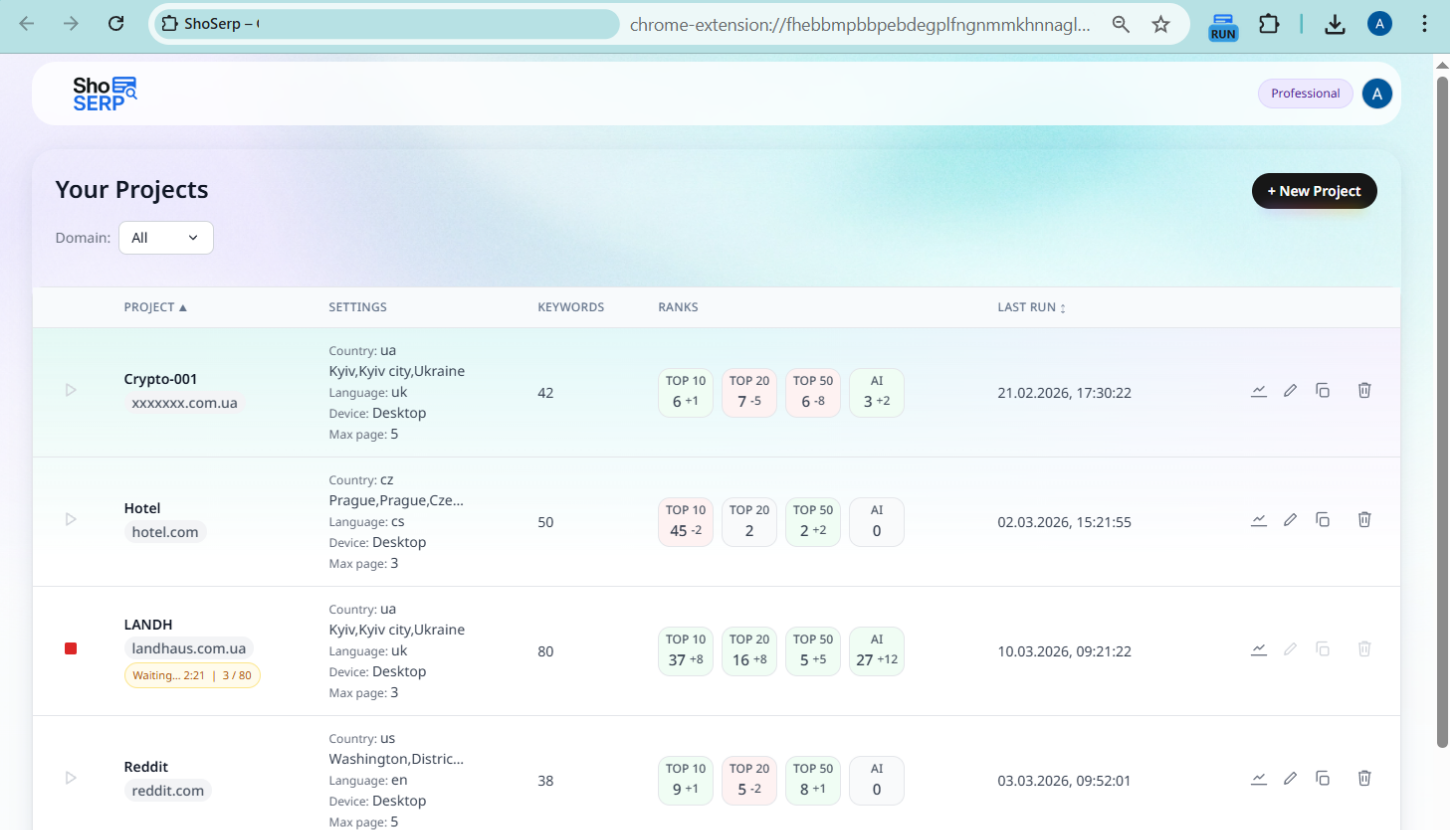
- Up to 100 projects with 100 keywords each
- Structured SERP snapshot for each completed check
- Country checks without a VPN
How to check keyword rankings in Google
Install the extension
Add ShoSERP from the Chrome Web Store and sign in with Google.
Create a project
Enter your domain and choose a country and search language. Set the search depth from one to five Google result pages.
Add your keywords
Enter your own keywords or get suggestions from a page URL or seed terms. Start with up to five keywords in your first project. You can add more after saving it.
Run your check
Keep Chrome open while you run the check. ShoSERP searches in background tabs and records your domain’s position when it appears.
What is a keyword rank checker?
A keyword rank checker finds where a domain appears in Google’s organic results for a search term. Say you sell trail shoes. A keyword position checker can tell you whether your category page ranks for “trail running shoes” in the UK. A rank tracker keeps that result so you can check again after changing the page and see whether a different URL moved ahead.
What you see in a ranking check
- Keyword position
- See where your domain appears within the Google result pages you chose to check. If no position appears after a completed run, the domain was not found in the collected results.
- Ranking URL
- Find the page Google returned for the keyword. For a shop, a website rank checker might reveal that a single shoe ranks for a broad search even though the category page offers a better selection.
- SERP snapshot
- Open the organic results saved with a check, including the titles and descriptions of pages that appeared alongside yours.
- Ads and AI Overview citations
- See the advertisers and sources cited in Google’s AI Overview when ShoSERP captures those SERP features. A domain can appear in an ad or citation as well as in the organic results.
- Competitors
- Free competitor analysis shows domains appearing across your tracked keywords in organic results, ads and captured AI citations.
- AI Overview tracker
- Review AI citations and organic results together in the saved snapshot.
Check website ranking by country and language
Run a desktop check for the US, then check the same terms in a separate project for India. Even with English selected for both, local shops and publishers can change which pages make the first page. Use ShoSERP as a website ranking checker for each market you serve. Pro adds city targeting and mobile results.
Google location changerWhy your own search may show a different position
Location, language and search history affect personal results. ShoSERP uses your market settings and asks Google to reduce personalization, but results can still vary. Compare checks with consistent settings.
Follow your rank history
Open a position from an earlier check to see what Google showed that day. A tracked day is a day you recorded a check. If you run checks every Monday, each Monday adds one day to your history. Both plans keep the same number of tracked days per keyword.
- Position trends for up to 730 tracked days per keyword
- Saved results for up to 100 tracked days per keyword
Where history is stored
Starter keeps history on your device. Pro syncs a cloud copy while the tracker is open, so you can access synced checks from another device.
Investigate ranking changes
One keyword changed
Compare two saved checks with the same settings. Did another page from your domain take the spot? Did a competitor publish something new? Open the competing URL before deciding whether to edit your page.
Several keywords changed
Look for the first date the keywords fell together. If the affected pages share a template, check for a recent change to that template. If several unrelated sites moved too, review the saved results for the same dates.
Positions differ between countries
Compare each market’s saved results. Local competitors and the language of their pages can help explain a gap in positions.
Find what to investigate next
Review positions 4–20
Look for keywords where your page ranks between 4 and 20 in the saved results. Open a keyword to compare your page with the pages above it.
Compare competitors
Pin competing domains, compare their organic positions with yours and see which domains also appear in ads or AI citations.
Audit a ranking page
Compare your page with the leaders across six audit groups covering technical, on-page, content, semantic, competitive and international SEO. Where available, PageSpeed Insights and Core Web Vitals show desktop and mobile performance. On Pro you can copy the evidence into an AI.MD brief for your own assistant.
Citation tracking
Review the captured sources and see whether your domain appears among them.
AI Overview trackerOne search or saved checks
An SEO rank checker shows your position in one search. Compare successive saved checks to see when it changed or which page overtook yours.
| Features | Single search | Saved checks in ShoSERP |
|---|---|---|
| Current result | Position and results at the time of the search | Latest saved position, URL and collected results |
| Earlier results | Not shown by the single search | Saved positions and snapshots available for comparison |
| Review and reporting | Review the results from that search | Compare checks and create shareable reports with Pro |
What’s included in free rank tracking?
Starter includes desktop checks by country and language, snapshots, keyword trends and competitor analysis. Both plans allow 100 active projects with up to 100 keywords each. Pro adds more precise targeting and ways to share what you find.
| Features | Starter, free | Pro, $9.90 per month |
|---|---|---|
| Desktop rank tracking by country and language | Yes | Yes |
| 100 projects, up to 100 keywords per project | Yes | Yes |
| SERP snapshots | Yes | Yes |
| Competitor analysis | Yes | Yes |
| Keyword dynamics | Yes | Yes |
| Position and snapshot history | Stored on this device | Cloud-synced history |
| City and mobile rank tracking | No | Yes |
| CSV and Excel exports | No | Yes |
| Shareable reports | No | Yes |
| Copy AI briefs for projects, keywords, and pages | No | Yes |
Who uses ShoSERP to check rankings?
Freelance SEOs
Keep client domains in separate projects with a free SEO rank tracker. When a client asks about a change, open the results saved for their market.
See the SEO specialist workflowAgencies
Organize work across up to 100 active projects. With Pro, share a keyword ranking report or export data for client discussions.
See the agency workflowIn-house teams
Track a site's keywords in different countries and languages, then compare results around content updates or other changes.
Site owners
Use the free rank checker to find the pages Google shows for your important searches and keep a record of later checks.
See the small business use caseFrequently asked questions
Is ShoSERP a free keyword rank tracker?
Yes. Free Starter includes desktop checks by country and language, saved results, keyword trends and competitor analysis, with up to 100 projects of 100 keywords each.
How do I check Google rankings for a keyword?
Install ShoSERP in Chrome, sign in with Google, create a project, add your keyword and start a manual check. Open the result to see its position, URL and collected results.
What is the difference between a rank checker and a rank tracker?
A Google position checker tells you where a page ranks today. A rank tracker saves each check so you can see when that position changed. ShoSERP does both.
Why is my personal Google search different from a tracker result?
Your location, language and previous searches can influence a personal search. ShoSERP uses the market you chose and asks Google to reduce personalization. Two people in that market can still see different results.
Can I check rankings in another country?
Yes. Choose the target country and language in your ShoSERP project to run a desktop check without a VPN. Pro also supports city targeting and mobile results.
How often should I check keyword rankings?
Weekly is a useful starting point. Check more often after important page changes or during a search update, using consistent settings.
Does ShoSERP run checks on an automatic schedule?
No. Start checks manually and keep Chrome open. If a run stops, review progress and resume where supported. Pro cloud sync does not run checks.
How many keywords can I track?
Starter and Pro each allow 100 active projects and up to 100 keywords per project. First-time setup starts with up to five keywords. You can add more by editing the project.
What happens if Google shows a CAPTCHA?
The check pauses. Solve the CAPTCHA in the Google tab, then return to Projects and resume the check. Google may ask again later in the run.
See where your keywords rank
Add ShoSERP to Chrome and check an important keyword. Your first saved result gives you a starting point for later checks.