

ShoSERPGeo SERP Preview
Google Location Changer for Chrome
Preview Google results for a country, city, language and device in Chrome. Enable Preview and search as usual. Explore organic results, ads, maps and AI Overviews when Google shows them for your search.
- 190+ supported countries
- All Preview settings without sign-up
- City and mobile preview included
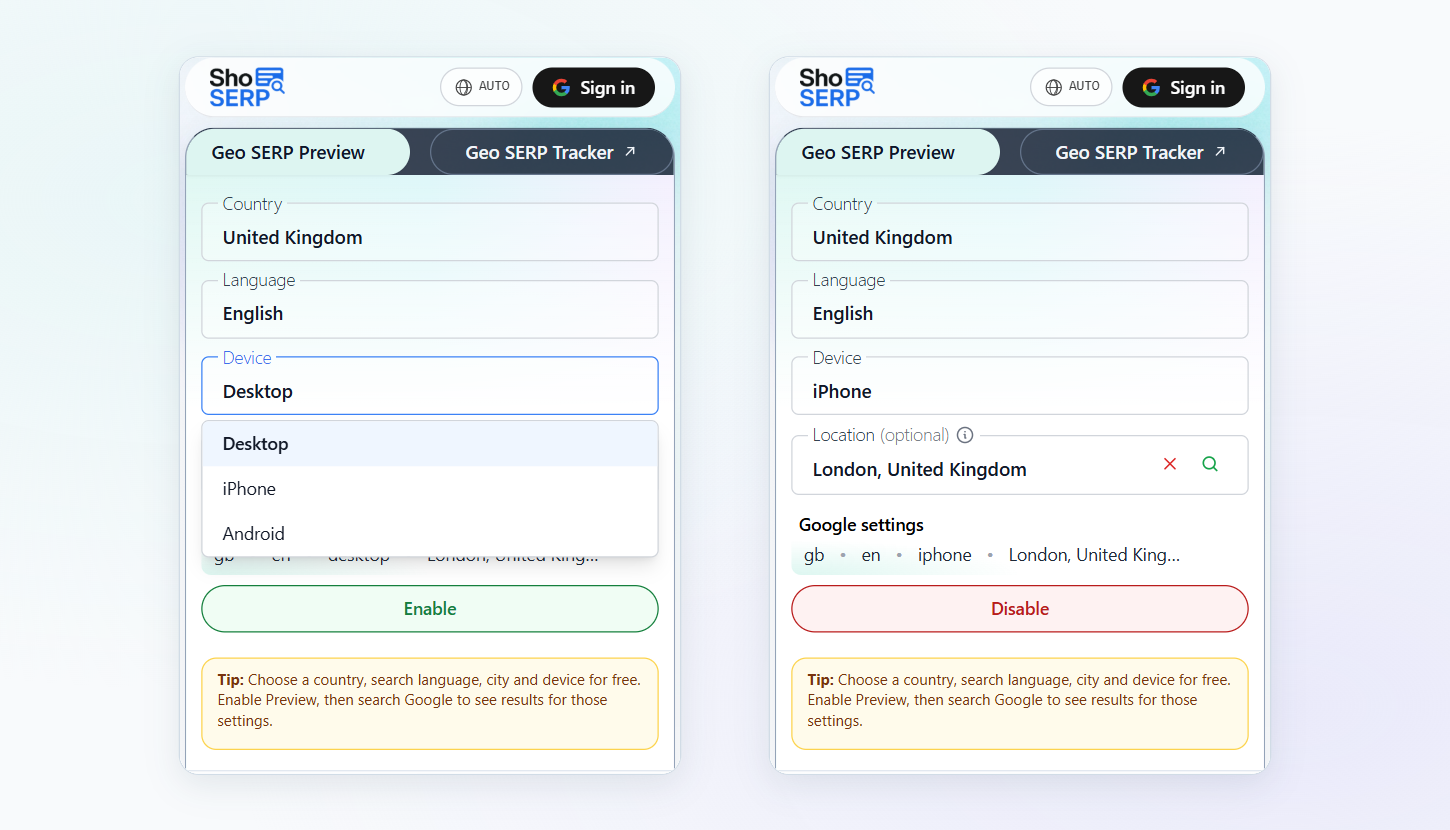
Change Google location in 3 steps
Add ShoSERP to Chrome
Install the ShoSERP extension and open it from your Chrome toolbar. Choose your country, language, city and device in Preview without creating an account.
Choose your settings
Choose from 190+ supported countries, select a search language, and optionally choose a city and an Android or iPhone device. All Preview settings are free without signing in.
Enable Preview and search
Choose your settings and click Enable, then search Google in the same browser. After selecting new settings, click Enable again to use them.
What is a Google location changer?
A Google location changer lets you choose a location for your searches so you can see results for another market. ShoSERP's Google search location changer works in Chrome. Choose your settings in the extension, then browse Google results and try related searches as you normally would.
One search, different markets
Google search results by country can show different pages, businesses and features. Check a query in each market to see which local businesses and international brands appear, and use those findings to plan your content or advertising.
United States
Example search
running shoes
Germany
Example search
running shoes
India
Example search
running shoes
Choose your search settings
- Country
- Choose from 190+ supported countries for free, with no sign-up. Change Google country settings whenever you want to check a new market or compare it with another.
- Search language
- Choose a search language for free without signing in. For example, check searches in English and Hindi in India to explore both audiences.
- City
- Choose a city for free to focus your search on a local market. Check the businesses, pages and maps Google shows for a relevant query.
- Device
- Choose desktop, Android or iPhone to preview Google results in that device context. All three options work in your Chrome browser.
Keep searching in your chosen market
Search Google from a different location while using your usual Chrome browser. Enable Preview once, then follow your research from one query to the next without resetting your country for every search.
- Browse live organic results, ads, maps and AI Overview when Google serves them for your search and market.
- While Preview is on, new Google searches use your selected settings.
- Your settings are saved for the next time you want to check a market.
How Preview applies your settings
Preview uses Google search settings to apply your choices. The gl parameter selects a country, hl sets the language and uule encodes a location. The pws=0 parameter requests reduced personalization. Preview can also apply an Android or iPhone device setting.
Preview does not change your IP address or network location. Your session, network and Google's behavior can still influence the results, so they may differ from what someone in the selected location sees.
Preview, VPN or URL parameters
Compare these ways to check another market, from setup and device settings to cost and tracking.
| Feature | ShoSERP Preview | VPN | URL parameters |
|---|---|---|---|
| Setup | Choose country and enable | Connect to a server | Edit each search URL |
| City targeting | Free | Depends on servers | Encode a location |
| Changes IP | No | Yes | No |
| Subsequent searches | Until disabled | While connected | Per URL |
| Mobile results | Android and iPhone, free | Varies by setup | Varies by setup |
| Cost | Free without sign-up | Varies by provider | Free to edit |
| ShoSERP tracking | Open previews from projects | No inherent connection | No inherent connection |
Ways to use a Google SERP location changer
Local SEO
Use ShoSERP as a free local SERP checker for a city. See which businesses and pages appear for relevant searches, and look for opportunities to improve your local content.
International SEO
Change Google region settings to compare the pages that appear across markets. Check searches in different languages and use your findings to guide a review of your international site.
Google Ads
See ads served for searches in your target market. Check the offers, messaging and businesses on the page as you plan or review a campaign.
See the marketer use caseAI Overview
Check searches for an AI Overview in your target market. When one appears, explore its cited sources and the topics it covers.
Client work
Explore a client's target market during a meeting or prepare a search example for a report. Show the country and settings you chose alongside your findings.
Market research
Search for products and services in a new market. Compare local businesses, international brands and the pages they use to reach customers.
Move from preview to tracking
Preview helps you check results in the moment. To follow keywords over time, create a Rank Tracker project for the same market. City and mobile rank tracking require Pro. Preview searches do not automatically create projects or save tracking history. You can also open a keyword preview using an existing project's settings.
Explore more in ShoSERP
Preview is free
Free without sign-up
| Geo SERP Preview features | Free |
|---|---|
| Country selection in 190+ countries | Yes |
| Search language | Yes |
| City targeting | Yes |
| Android and iPhone settings | Yes |
Frequently asked questions
What is a Google location changer?
A Google location changer lets you choose a location for your searches. ShoSERP works in Chrome and lets you check another country or city.
Is Geo SERP Preview free?
Yes. All Preview settings are free without signing in, including country, search language, city, desktop, Android and iPhone.
Do I need a VPN to check another country's results?
No. Choose a country in ShoSERP and enable Preview. You can then search Google in Chrome using that setting without connecting to a VPN.
How closely will results match a local search?
Preview applies your chosen settings and requests reduced personalization. Your session, network and Google's behavior can still affect results, so a local searcher may see a different page.
Can I see ads and AI Overview?
Yes. You browse live Google results, which can include ads, maps and AI Overview when Google serves them for your search and market. Their appearance is not guaranteed.
Can I check a specific city?
Yes. City targeting is free in Preview. Choose a country and city in the extension, enable Preview and search Google to explore that local market.
Can I check mobile results?
Yes. Choose Android or iPhone settings in Chrome for free. Enable Preview and search Google to check mobile results for your chosen market.
How do I turn Preview off?
Open the ShoSERP extension and click Disable. Your next Google searches will no longer use Preview settings, and your choices will remain saved for later.
What does uule do?
uule is a Google search parameter that encodes a location. ShoSERP handles it for you when you use Preview, including when you choose a city.
Explore your next search market
Install ShoSERP in Chrome, choose your search settings and enable Preview. Explore country, language, city and mobile results for free, without signing in.